Blog Web design, development and anything else we feel is relevant
AWS Easy Page Link
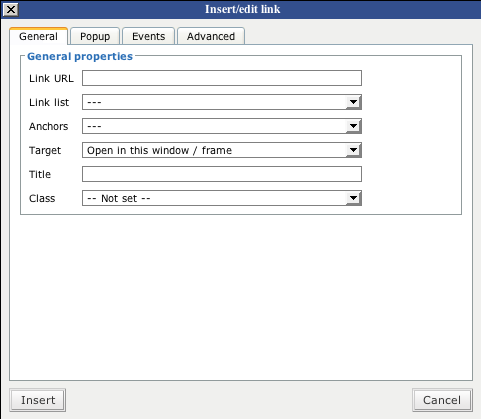
This is our first plugin created for WordPress – Easy Page Link. When entering content into WordPress sites, sometimes you want to cross link pages within the site. Remembering what the URL to the other page is a pain, so this takes advantage of the built in editor’s features by creating a simple drop down list with all your existing pages. Simply select the page you want to link to and the URL is put in for you.
View plugin page on WordPress.org


Comments
January 21, 2008
I downloaded your easy link plugin, uploaded and activated it but when i insert a link the dropdown list isn’t in tinyMCE advanced
January 22, 2008
You need to force refresh your browser window when writing/editing – the TinyMCE JavaScript is very stubborn and likes to keep using a cached version of itself instead of updating every time.
January 22, 2008
I have the same problem. I installed it, activated it but it doesn’t show up when I click on “insert/edit link”. Event the force browser refresh doesn’t help.
Any idea?
January 23, 2008
If you have force refreshed (Shift + F5) repeatedly, I’m not quite sure. I have installed it on multiple client sites, with and without TinyMCE Advanced Plugin, and have never had an issue yet. There may be another plugin you are using which is conflicting with this one. You need to deactivate all others and see if the problem still persists.
January 24, 2008
[...] http://www.ashwebstudio.com/wordpress/aws-easy-page-link [...]
January 31, 2008
An issue was finally found which caused the problem for most people. It was because WordPress’ website changed the folder name from “AWS-easy-page-link” to “aws-easy-page-link”. This change in case caused an invalid URL. The plugin has been updated to v 0.2
February 1, 2008
Trying to time a plugin like yours? But with Advanced TinyMCE unfortunately I do not work! I tried shift + F5 to remove the cache, to enable / disable the two plugin …
any idea for me?
February 1, 2008
Please make sure you are using v0.2
February 1, 2008
yes, my configuration is wp 2.3.2 with tinymce advanced 2.2 and AWS Easy Page Link v 0.2 on MAMP installation (local apache mysql etc on mac os x)
February 1, 2008
Check to make sure path’s are correct to the link list file. To do this, View Source when editing a page/post. Look for “tiny_mce_config.php”. Copy the full URL and paste into your browser window. Now you are looking for “link-list.php”. Copy that full URL and paste into your browser window.
If you get a 404, then there is a path issue. I have no idea what could cause that as this plugin does work on all my client sites as of v0.2. Check the path and make sure it makes sense.
You should get some JavaScript coding.
February 1, 2008
Many thanks:
this is http://localhost:8888/blogURL/wp-includes/js/tinymce/tiny_mce_config.php?r=6332&ver=20070528
initArray = {
mode : "specific_textareas",
editor_selector : "mceEditor",
width : "100%",
theme : "advanced",
[.........other code...........]
inline_styles : true,
plugins : "inlinepopups,autosave,spellchecker,paste,wordpress,-cforms,-ps_imagemanager_tinymceplugin,bold,-NextGEN,table,media,fullscreen,visualchars,nonbreaking,style,emotions,searchreplace,xhtmlxtras,advlink,advimage,contextmenu"
};
initArray.external_link_list_url = "http://localhost:8888/blogURL/wp-content/plugins/aws-easy-page-link/link-list.php";
tinyMCE.loadPlugin("table","http://localhost:8888/blogURL/wp-content/plugins/tinymce-advanced/mce/table");
tinyMCE.loadPlugin("media","http://localhost:8888/blogURL/wp-content/plugins/tinymce-advanced/mce/media");
[.........other loadPlugin...........]
var placeholder="placeholder for:";var formnames=new Array("Contatti","Preventivi","Lavora con noi");var purl="http://localhost:8888/blogURL/wp-content/plugins/contactforms/js/"; tinyMCE.loadPlugin("cforms", "http://localhost:8888/blogURL/wp-content/plugins/contactforms/js/");
tinyMCE.loadPlugin("NextGEN", "http://localhost:8888/blogURL/wp-content/plugins/nextgen-gallery/js/");
tinyMCE.init(initArray);
and the http://localhost:8888/blogURL/wp-content/plugins/aws-easy-page-link/link-list.php it’s all ok!
February 4, 2008
Then you need to disable all other plugins to see if another plugin is affecting this one.
February 10, 2008
ok, i disableb all plugin. It’s work fine!!! may many thanks!!!
February 22, 2008
would love to see support in the link list dropdown for third-level nested lists.
March 27, 2008
Great plugin idea, really need this. Any chance it is updated to work with WP2.5?
April 1, 2008
YES!! WP 2.5 compatibility would rock! I miss this plugin already…
April 11, 2008
Hi Derek, great plugin idea. I’m using WP 2.5, I can’t tell whether the plugin is going or not. I also use TinyM advanced. I can;t see a separate icon for the plugin in the normal icon set for TM, does the plugin extend the normal link insert option? When I click on this I get the standard link insert window. How do you actually formulate lists of links in the firrst place?
Once again – thanks
April 11, 2008
Currently this plugin doesn’t work with 2.5 – they completely redid how TinyMCE works within WordPress. I have not yet had time to work on an update.
April 11, 2008
I really like you site and your easy link plugin.
When are you guys going to upgrade 2.5
April 18, 2008
Cheers Derek, its annoying really that they did, several extensions I have for Tinymeece dont work now – and the one they have out of the box isn’t really powerful enough. I can’t understand why certain features you see as standard on TM installs in other CMS are left off. Thanks for the answer
April 20, 2008
Hello,
I really do like your plugin so I tried to find a way to use it with WP 2.5/Tinymce 3. The following code should solve the problem:
function AWS_easy_page_head( $initArray ){
$initArray['external_link_list_url'] = get_option(’siteurl’) . ‘/wp-content/plugins/aws-easy-page-link/link-list.php’;
return $initArray;
}
add_filter(‘tiny_mce_before_init’, ‘AWS_easy_page_head’);
April 23, 2008
Thanks to Petra, I have updated the plugin to work with 2.5
April 29, 2008
Hi Derek,
too bad you updated the Plugin so it requires Wp 2.5 now. Do you still have a version that works on version prior to 2.5 and TinyMCE Advanced? That’d be great for all of those who are not planning to update to the buggy WP 2.5 just yet. Thanks a lot!
Frank
April 29, 2008
You can always visit the past tagged versions, http://svn.wp-plugins.org/aws-easy-page-link/tags/ – version 0.2 was for pre-2.5
August 25, 2008
THANK YOU!! I had given up on WP as a CMS because your plugin didn’t work with 2.5+. Now I picked it up again and found your plugin working and I am back in business!!
September 5, 2008
Hi, Thanks so much for your plugin!
In order to get it to work with WP2.6 I had to replace the ‘require’ call to wp-config.php in link-list.php with the following:
$root = dirname(dirname(dirname(dirname(__FILE__))));
if (file_exists($root.'/wp-load.php')) {
require_once($root.'/wp-load.php');
} else {
// Pre-2.6 compatibility
require_once($root.'/wp-config.php');
}
header('Content-Type: text/javascript; charset='.get_bloginfo('blog_charset').'');
September 8, 2008
FYI, I’ve never had to do this workaround for 2.6 – I install my plugin on every client site and have been doing so successfully without this extra code.
September 23, 2008
I have just installed wordpress 2.6.2 with this plugin, and i doesn’t find the toolbar button on the page editor, does it work with the default WordPress editor or i shoudl put the advanced one?
September 25, 2008
There is no additional toolbar button in the editor, you use the regular linking button – there is just an extra drop down now available which allows you to select pages created within your WordPress setup.
October 28, 2008
I have updated the plugin to version 0.5 – it now supports unlimited levels of children pages. This has been tested up to WP 2.6.3 and working successfully.
December 11, 2008
Hi, first of all thanks for a great plugin! I developed my site locally with wamp, and everything was working great, but when i move my site to the server, all internal links are still pointing to my localhost site. Is there an easy way to change the link address or do i have to redo all the internal links?
December 11, 2008
When you move your site to a new domain (which is what you are doing), you have to change all the URLs for everything. See here for more info
December 16, 2008
Does the 0.5 version of the plugin work with 2.6.5?
December 16, 2008
The plugin works up to 2.7
December 31, 2008
[...] AWS Easy Page Link [...]
March 13, 2009
Hey! Love the plugin, but I can’t get it to work when using the Mandigo theme. Is this somethin you’ve heard before?
March 13, 2009
This plugin has nothing to do with themes, it should work regardless of which one you are using.
March 20, 2009
This plugin was exactly what I was looking for, but I can’t find my private page in the link list. Am I doing something wrong?
March 20, 2009
You are not doing anything wrong. The plugin uses wp_list_pages which does not grab private pages.
September 29, 2009
[...] 「AWS Easy Page Link」 [...]
December 9, 2009
[...] easiest solution is to use the AWS Easy Page Link plugin. Unfortunately, the plugin hard-codes the link, and since I’m building the site on my [...]